Job scheduling & calendar
Create work orders, assign technicians, and keep the day organized from one calendar view.
TradesCraft Pro is field service management for small trade businesses.
Scheduling, dispatch-ready job tracking, customer records, technician workflows, and invoicing live in one place. The product fits HVAC, plumbing, electrical, landscaping, and similar trades.
No credit card required.
TradesCraft Pro is in active development. New features are released regularly.
Works for
Trades and service types include HVAC, Plumbing, Electrical, Carpentry, and many more.
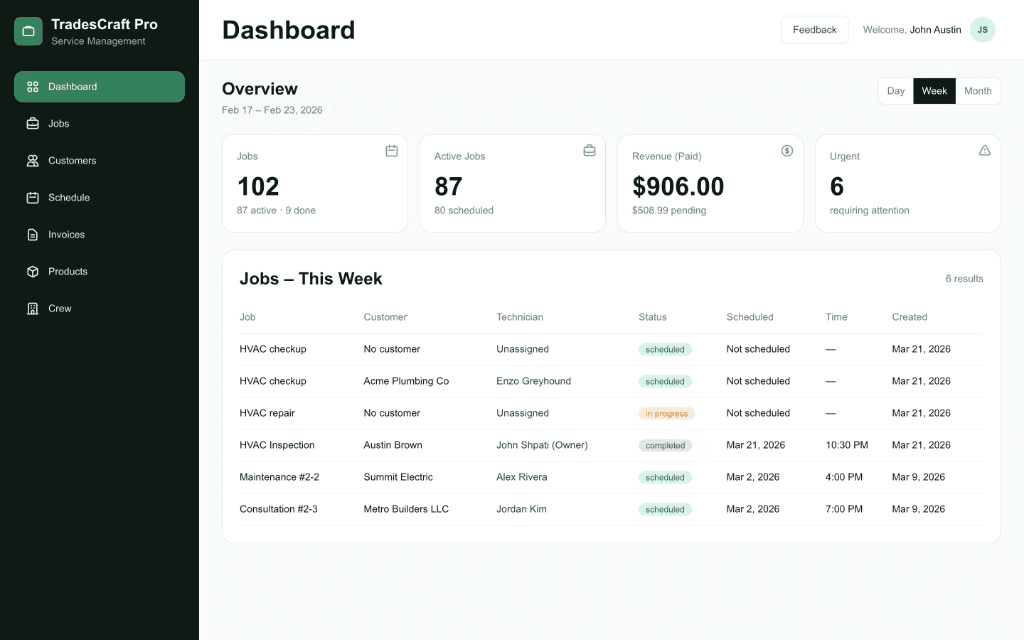
Your operations hub highlights open jobs, revenue trends, crew workload, and customer follow-ups.
That context helps you dispatch work without jumping between spreadsheets, texts, and paper tickets.
Many crews start with shared spreadsheets, texts, and paper tickets. Those tools work early, but they break down as volume grows.
TradesCraft Pro keeps schedules, history, and permissions in one system so owners and techs see the same job story without digging through threads.
| Topic | Spreadsheets & paper | TradesCraft Pro |
|---|---|---|
| Job history | Often scattered across files, notebooks, and message threads. Searching by customer or site is slow. | Jobs and notes stay tied to the customer record. Your crew opens one timeline per account. |
| Crew access | Everyone sees everything, or you maintain separate copies by hand. | Role-based access limits what technicians and admins can view or change. |
| Scheduling | Calendars and whiteboards rarely include full customer context by default. | Scheduling sits next to job and customer details so dispatch stays informed. |
| Invoicing | Often a separate tool or manual PDFs. Line items can drift after the job closes. | Invoicing is in active development inside the same product as jobs and customers. |
| Mobile field use | Spreadsheets on phones are fragile. Paper cannot update in real time. | Technicians use modern mobile browsers for notes and status while on site. |
You get job management, customer history, mobile-friendly workflows, and permissions sized for contractors.
We skip enterprise bloat so small crews can adopt quickly.
Create work orders, assign technicians, and keep the day organized from one calendar view.
Store contacts, locations, and past visits so your field team has context on every job.
Capture scope changes, site photos, and handoff notes so the whole crew stays aligned.
Technicians use phones or tablets in the van; office staff use the desktop, all on the same real-time data.
Create invoices and track payments.
Owners, admins, and technicians see the right data for their role, which protects margins and customer privacy.
Create your team members and define the services you offer.
Create jobs, assign them, and track progress.
Keep records clear and manage invoices as features roll out.
TradesCraft Pro is free while we're in development. You get full access to current features—no credit card required. We'll email you before any paid subscription begins.
When billing starts, we plan simple per-user pricing at $33 / user / month, billed monthly, with a 30-day trial and advance notice before your first charge.
Free
All current features included. No credit card required.
We'll notify you before paid plans go live.
$33 / user / month
Billed monthly. Add or remove users anytime. A 30-day trial is planned, with email notice before any charges.
Volume discounts and custom terms will be available once paid plans are live. Get in touch and we'll follow up when billing begins.
Answers are plain language. Open any row to read the full response—no extra scripts required.
Join trade crews who keep customers, work orders, and billing context together instead of splitting them across tools.
Please verify you're human before sending your message.